Two way binding between Rust & Java

Looking at the two articles on my blog you might think I have a problem with inter-language operability. But, it's just the types of problem that I like to solve and, that I encounter in my projects. Let's dive in.
The JNI
One day you might need to use a native library from Java, when that day comes, you will resort to using the Java Native Interface, JNI for short. It's the standard Foreign Function Interface of Java, introduced in the JDK 1.1 and released 28 years ago in 1997. Recently, with the release of Java 22, a new API has seen the light of day to replace the JNI with the Foreign Function and Memory API. However, we will only be looking at the JNI in this article because most systems are still using older Java versions.
The JNI is quite versatile, while it's mostly used for downcall, meaning using a native library from the JVM. It also allow the inverse, to do upcall, so calling JVM code from native code.
Furthermore, it even permits us to directly launch the JVM from our native code by using the Invocation API
With this overview of the JNI, we now have all the pieces to launch a Java library from Rust, call its methods, and allow it to call native methods.
Java
Let's first start by writing the Java side, with a really simple test class.
package fr.aime23.test;

public class Test {

    public static void testUpcallDowncall() {
        Test.testDowncall();
    }

    public static void testUpcall() {
        System.out.println("Hello from Java");
    }

    public static native void testDowncall();
}
I added 2 static methods, one that logs to the console, and one that call a third method that is marked as native and will be provided by a native library.
Let's compile this with javac Test.java this will give us the compiled Test.class.
That's all we need the Java part.
Rust
For Rust we first need to create a new project and add the jni dependency with the invocation feature enable, here I am using version 0.21.0.
Starting the JVM
The jni-rs give us in it's documentation the code to launch a JVM directly from Rust.
// Build the VM properties
let jvm_args = InitArgsBuilder::new()
          // Pass the JNI API version (default is 8)
          .version(JNIVersion::V8)
          // You can additionally pass any JVM options (standard, like a system property,
          // or VM-specific).
          // Here we enable some extra JNI checks useful during development
          .option("-Xcheck:jni")
          .build()
          .unwrap();

// Create a new VM
let jvm = JavaVM::new(jvm_args)?;

// Attach the current thread to call into Java — see extra options in
// "Attaching Native Threads" section.
//
// This method returns the guard that will detach the current thread when dropped,
// also freeing any local references created in it
let mut env = jvm.attach_current_thread()?;
From : https://docs.rs/jni/0.21.1/jni/struct.JavaVM.html#launching-jvm-from-rust
In this example they also call the Math#abs method.
// Call Java Math#abs(-10)
let x = JValue::from(-10);
let val: jint = env.call_static_method("java/lang/Math", "abs", "(I)I", &[x])?
  .i()?;

assert_eq!(val, 10);
From : https://docs.rs/jni/0.21.1/jni/struct.JavaVM.html#launching-jvm-from-rust
Running this you should be greeted with nothing, which is good.

Some explanations
So what is happening ?
First we are building the arguments for the JVM :
let jvm_args = InitArgsBuilder::new()
			  .version(JNIVersion::V8)
			  .option("-Xcheck:jni")
			  .build()
			  .unwrap();
We are using JNI version 8, this choice depends on the Java version you will be using. At the time of writing, the latest JNI version is 24; however, the jni crate only supports up to version 8. Stuck on JNI V8 you will miss out on module support introduced in Java/JNI 9, virtual threads support introduced in version 21, and GetStringUTFLengthAsLong in version 24. The JNI is backward compatible so we don't have to worry about it when using newer Java versions.
Then, we create the VM using our arguments.
let jvm = JavaVM::new(jvm_args)?;
This will auto-find libjvm using the java-locator crate, which will search for it in JAVA_HOME or directly through the java command.
Then we attach the current thread.
let mut env = jvm.attach_current_thread()?;
This give our native thread to the JVM to use as its main thread and in exchange, this allow us to get the JVM environment. This is the structure that let's us interact with the JVM, its also binded to our thread and should not be shared with other threads.
Then we can call our method using the provided env
let x = JValue::from(-10);
let val: jint = env.call_static_method("java/lang/Math", "abs", "(I)I", &[x])?
	.i()?;
To call the abs method we need to provide the fully qualified name of the method's class with foward slash instead of dots, the method name and, in third we need to pass the method signature using the JVM format, more on that later.
Tweaking the example
Now let's try tweaking the example to use our Test class. First let's replace the class FQN and method's name in call_static_method.
env.call_static_method("fr/aime23/test/Test", "testUpcall", "(I)I", &[x])?;We also needed to replace the method signature with our own. To do this we can reference the Java documentation on JNI. There, we are provided with the following table :
| Type Signature | Java Type |
|---|---|
| Z | boolean |
| B | byte |
| C | char |
| S | short |
| I | int |
| J | long |
| F | float |
| D | double |
| V | void |
| L fully-qualified-class ; | fully-qualified-class |
| [ type | type[] |
| ( arg-types ) ret-type | method type |
We need to make testUpcall type which has zero arguments and return void. Guided by this table we can infer the following signature ()V.
Replacing the signature and removing the arguments we get this :
env.call_static_method("fr/aime23/test/Test", "testUpcall", "()V", &[])?;Let's now run our new code.
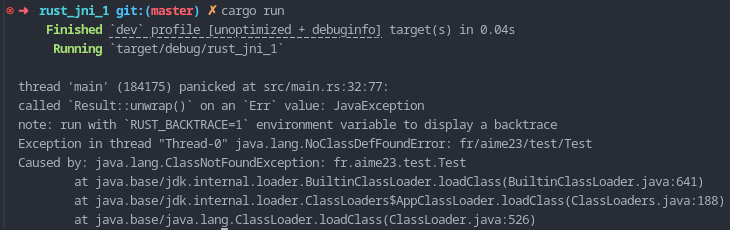
We are sadly met with an error, the JVM cannot find the fr.aime23.test.Test class.
Finding the class
If you were following along you might have seen this coming, we never really told the JVM about the Test.class file, lucky for us it's really easy and we just need to add the file to the classpath by providing an argument to the JVM.
Adding -Djava.class.path=./java/ option to args builder, this Define the java.class.path property. Note that this will need the directory structure to follow the package name just like this :
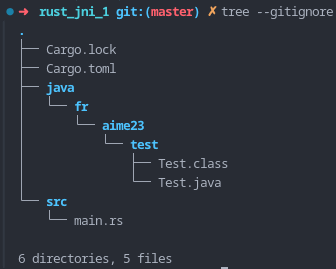
Having added this if we rerun our test we will be greeted by an Hello from Java

Going up and down
Now that we can go down let's try going up. We need to create the Rust homologue to the testDowncall method that we defined in our Test class.
So let's add a testDowncall function the just logs Hello from Rust.
fn test_downcall() {
    println!("Hello from Rust");
}
We then need to give the JVM access to it, to do this we will use the register_native_methods of JNIEnv. This allow us to add our native method to a class. First we need the Test class, that we get using JNIEnv#find_class.
let test_class = env.find_class("fr/aime23/test/Test")?;Secondly we need a NativeMethod, looking at the documentation at https://docs.rs/jni/0.21.1/jni/struct.NativeMethod.html#structfield.fn_ptr, we need to change our method signature and add env and class args.
fn test_downcall(_env: JNIEnv, _class: JClass) {
    println!("Hello from Rust");
}
NativeMethod#fn_ptr also ask for a c_void that we provide by marking testDowncall as extern "C".
extern "C" fn test_downcall(_env: JNIEnv, _class: JClass) {
    println!("Hello from Rust");
}
So now that we have everything ready let's register it
let test_class = env.find_class("fr/aime23/test/Test")?;
let test_downcall_native = NativeMethod {
    name: JNIString::from("testDowncall"),
    sig: JNIString::from("()V"),
    fn_ptr: test_downcall as *mut c_void
};
env.register_native_methods(test_class, &[test_downcall_native])?;
And call it and run it
env.call_static_method("fr/aime23/test/Test", "testUpcallDowncall", "()V", &[])?;

Error handling
If you are familiar with the JNI API in C, you might have noticed that I don't talk about the handling of the error throw by the JVM. Usually you will use ExceptionCheck, ExceptionDescribe, ExceptionOccurred to get access to those, however the jni crate already does every thing for us, and wrap every method call into a Result
Other libraries
J4RS : https://github.com/astonbitecode/j4rs
Provide a higher level api, async support and is actively mainteined
Closing thought & going further
I hope this tutorial will be of help in your multi-language interoperability needs.
In the future I want to explore generating Rust trait and impl from Java class to speedup and enhance the process.